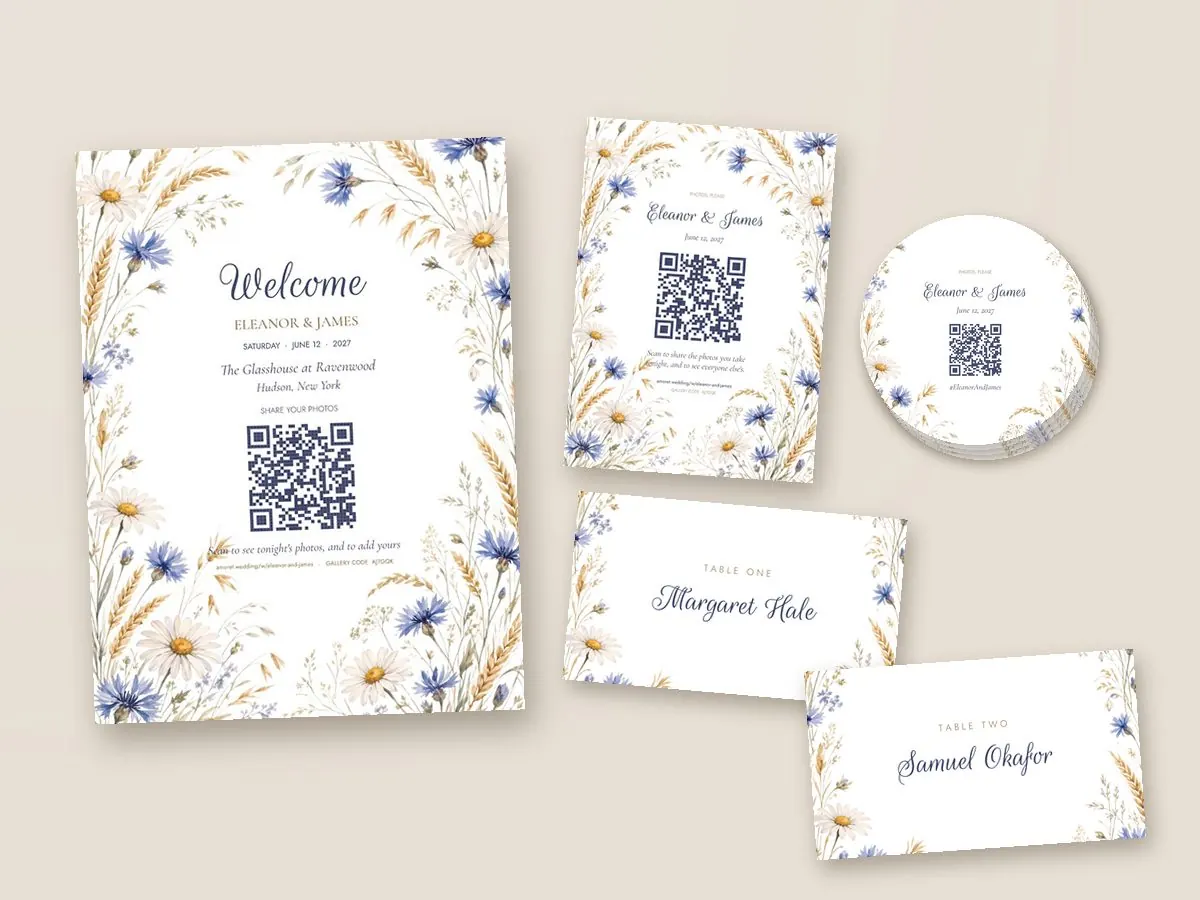
Set up your wedding, invite your guests, and turn the moments they capture into keepsakes. One link and one QR code do the whole job, from the save the date to the thank-you card.
The speeches from the back table, the dance floor at midnight, your grandmother laughing at something across the room. Somebody caught all of it on the phone in their pocket, and this is how it reaches you, beside your photographer’s work.
01
Make your Amoret
Your Amoret has its own easy-to-remember link and QR code. Print signs at home for free, or order table cards and a welcome sign in your wedding’s design, shipped to you, that ask your guests to share what they capture.
02
They scan and shoot
Your Amoret gallery opens in any browser. No download, no sign-up, no password. Guests take a photo, add a detail if they wish, and it appears in your gallery.
03
You get something to hold
The morning after the big event, your Amoret is full. Pick your favorites for the thank-you cards and a box of real prints.
One code, four lives
The code on the table is never out of date
Print it once. What a guest sees when they scan depends entirely on when they scan it.
Before
A save the date that lives in their pocket
Your Amoret’s link and QR code work the moment they are created. Guests who visit in the weeks before see a countdown, your story, the running order for the big day, directions, and where you are registered. By the time they arrive, they already know your Amoret.
On the day
The same Amoret, ready to capture your day
On your wedding day your Amoret takes guests straight to your gallery. Guests post what they shoot, react to each other, take on photo challenges and leave you a note in the guest book. Stream your Amoret on a projector and the room enjoys the memories it is collecting for you.
The week after
Late uploads still welcome
Guests can add photos for two weeks after the wedding, and on Classic for up to three months, as you choose. Anything you would rather nobody saw, you take down.
Forever
It becomes the place the wedding lives
Uploads close, but a paid gallery does not. Guests can still visit, download the photographs, and order their own prints. It stays open to the couple for good, so a box of prints can wait for your first anniversary, or your fifth.
For your guests
The easiest thing they will do all night
Every barrier you put between a guest and a camera costs you photographs. So there are none.
Nothing to sign up for
They tap the code, type a first name if they feel like it, and start posting. That is the entire onboarding.
Photo challenges
“Find the couple here who have been married longest.” A prompt gives a guest a reason to pick up the camera, and a reason to post what they took.
Aunt Ruth can order a box of prints of the photos she is in without asking you to send her the files.
For the two of you
Everything comes to one place
Your dashboard is where the photographs, the replies and the orders arrive, and where you decide what happens to each.
Approve what is shown
Turn on approval and every photo waits for you before anyone else sees it. Anything you would rather nobody saw is gone with one tap.
Star your favorites
Star the photographs you love as they come in, and they are the first ones picked for your thank-you cards and your prints.
Your photographer’s photos too
Your photographer adds the finished photographs beside your guests’, marked and credited to the studio, so you choose from both in one place.
Replies and addresses in one list
Guests reply from the same link, with their meals, any dietary needs and, if you ask, their mailing address. Download the list, or the addresses for the envelopes, whenever you like.
Printed in our own studio
Stationery, signs and prints, made on our own presses in five business days, every photograph from the full-size original your guest posted, and tracked to your door.
Kept at full size
Every photo is kept exactly as the guest’s phone took it, never shrunk for the screen, so any of them can be downloaded or printed at full size.
Privacy
As open or as private as you like
Galleries start open to anyone with the link, the way most couples want them. These three are a switch each.
A key in every code
A private gallery has its own code, printed inside every QR code we make, so guests who scan walk straight in and a stranger who guesses your names does not.
Approve your guests
Ask guests to be let in, and answer each one from your dashboard before they see anything.
Revealed in the morning
Until the morning after, each guest sees only their own photos. Then the whole gallery opens at once, which is a lovely thing to wake up to.
Make your Amoret with your names and your date, choose its look, and you have your own link and QR code at once. It takes about five minutes. Add your story, the day’s schedule, travel notes and your registry whenever you are ready.
What do guests see before the wedding?
Your wedding page: a countdown, your story, the running order, directions, hotels, where you are registered, and the RSVP. The same link becomes the gallery on the day. More on the wedding website.
Can guests add photos after the wedding?
Yes. Uploads stay open for two weeks after the wedding on the free plan, and on Classic you choose anything from one week to three months. You can close the gallery to new photos at any time.
Can guests share videos?
On Classic, yes: a guest can leave a short video message, up to fifteen seconds, which goes into the gallery beside the photographs.
What happens to the gallery after the wedding?
Uploads close when you say, but a paid gallery stays open for good. Guests can come back to it, download the photos they are in and order their own prints, and you can order prints of it years later.
One QR code. Every photo your guests took. Turned into things you can hold.
Setting it up takes about five minutes and costs nothing until you decide it is worth something.